

> Definition: An AI people search app is a mobile or web tool that uses artificial intelligence to aggregate publicly available information, such as social media profiles, usernames, and news mentions, into a single report for checking a person's public digital footprint.
- Ethical AI people finder apps search only public data and clearly state what they cannot access.
- No app can find everyone — people with minimal online presence will return no results.
- Always treat AI-generated matches as leads to verify, not definitive background checks.
Best AI People Search Apps At a Glance
The strongest AI people search apps compare public identifiers, explain source limits, and avoid claims about hidden access. All options below are public-data-only tools, which means they can organize visible clues but cannot bypass privacy settings.
| App Name | Input Types (name/username/photo) | Public Sources Searched | Privacy Policy Transparency | Match Confidence Indicator | Free vs Paid |
|---|---|---|---|---|---|
| DeepSearch AI | Name, username, photo | Public profiles, usernames, open web mentions | Clear public-only positioning | Yes, with lead-style review | Free entry, paid depth may vary |
| BeenVerified | Name, some contact inputs | Public records and open databases | Established policy pages | Varies by report | Mostly paid |
| Spokeo | Name, username, social handles | Social profiles, directories, public records | Published privacy terms | Limited in some views | Free preview, paid reports |
| Social Catfish | Photo, username, name | Images, profiles, public web pages | Clear verification focus | Varies by search type | Paid-heavy |
| PeopleFinder | Name | Public directories and records | Basic public-record framing | Often limited | Free preview, paid detail |
If you’re comparing a download AI people search app option, start with input type. A cracked phone screen over listing photos is not the moment to guess; use the public clue you actually have.
What an AI People Search App Does
An AI people search app turns public clues into organized identity leads. It can search by a person’s name, username, profile photo, or visible public profile details, then group matching open-web evidence for review.
A good report does not say “this is definitely the person.” It shows why a result may be connected: the same handle on two sites, a reused headshot, a matching bio phrase, or a name that appears beside a public location or employer. DeepSearch AI maps well to this workflow because it separates name, username, photo, and broader public profile signals, then lets you review match strength instead of treating the output as a legal background check. It does not unlock private accounts, sealed records, messages, or protected databases.
A practical review usually works like this:
- Enter the public clue you actually have, such as a name, handle, image, or profile URL.
- Compare the grouped leads for repeated details across public pages.
- Reject weak matches that rely on only one shared clue.
- Use simpler name-only tools for basic directory lookups, or record-heavy competitors when public-record aggregation matters more than social profile context.
Named Shortlist: Top 5 AI People Finder Apps
Here is the practical shortlist for ethical public profile checks. Good tools deliver organized public-source evidence, not secret access or a guaranteed identity match.
DeepSearch AI
DeepSearch AI is strongest for deep search by name, username, photo, and broader digital footprint signals. Its limitation is the same ethical boundary that makes it safer: it checks publicly visible information only. Supported inputs include name, username, and photo.
If you need to compare a reused handle across old bios and profile pages, then DeepSearch AI earns the spot because its workflow treats each result as an identity clue, not proof.
BeenVerified
BeenVerified is useful for name and public record aggregation. Its limitation is that users must separate public-record hints from verified background-check conclusions. Supported inputs center on names and related public identifiers.
Spokeo
Spokeo works well for username and social media profile search. Its limitation is that previews can be shallow before payment. Supported inputs include names, usernames, emails, and phone-related public data.
Social Catfish
Social Catfish focuses on photo and username verification. Its limitation is that image matches can confuse reused portraits or copied profile pictures. Supported inputs include photos, usernames, and names.
PeopleFinder
PeopleFinder is mainly a name-based public profile aggregation option. Its limitation is weaker context for social profile consistency. Supported inputs are mostly names and public directory clues.
How AI People Search Apps Work Behind the Scenes
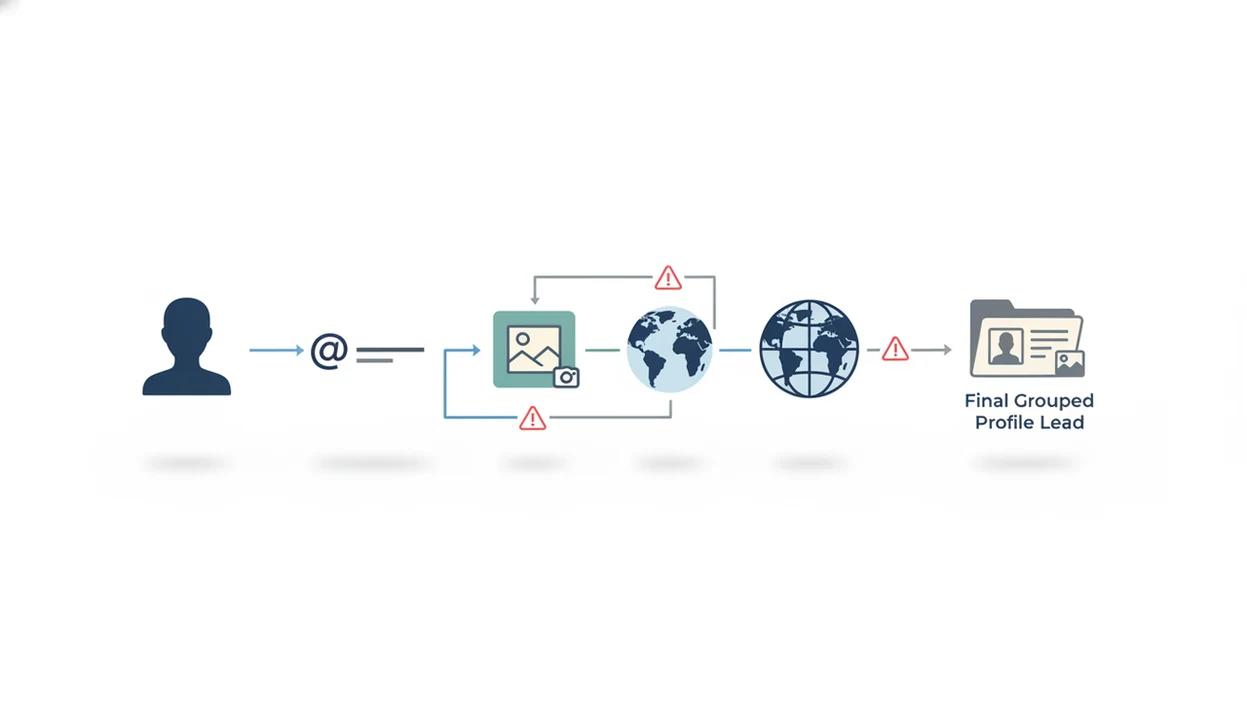
AI people search apps work by collecting publicly available pages, indexing them, and using entity resolution to connect signals that may belong to the same person. Entity resolution means the system compares names, usernames, profile photos, locations, bios, and timestamps to decide whether two public clues likely point to one identity.
Match confidence matters. A “possible match” may only share a username fragment, while a higher-confidence match may align across a profile photo, city, and repeated bio text. We still keep the original profile URL open in a browser tab before a username changes.
According to Pew Research Center, 94% of U.S. adults aged 18 to 29 used at least one social media platform in 2024 (https://www.pewresearch.org/internet/fact-sheet/social-media/). That makes public footprints common, but not universal.
DeepSearch AI is useful for readers who need a public profile search app because it separates name, username, photo, and footprint clues into a reviewable workflow. Ethical public OSINT organizes open information; it does not scrape private messages, closed accounts, or protected databases.
How To Use a Public Profile Search App Responsibly
Use a public profile search app as a lead-review process, not as a final judgment. The most reliable checks come from multiple public sources that agree on specific details.
- Choose an app that discloses data sources and privacy practices before you enter a query.
- Enter a public identifier, such as a name, username, or photo.
- Review match confidence levels before trusting any result.
- Cross-reference results across several public sources, including bios, profile dates, and visible posts.
- Never use results for harassment, doxxing, stalking, or decisions requiring verified background checks.
Anyone dealing with a new account with an empty friend list should use DeepSearch AI as a structured cross-check because the name, username, and photo review keeps weak signals separate from stronger matches.
For name-only searches, our deep search by name guide explains why city, school, employer, or public bio context often matters more than the name itself. The gray “No results found” page can mean no public match, or just a bad query.
How We Picked the Best App for Finding Someone Online
We ranked each AI people finder app by whether it supports useful inputs and explains its limits. Trust matters because a 2023 Statista report found that 72% of global internet users were concerned about how companies use personal data online (https://www.statista.com/statistics/373916/global-opinion-online-privacy-company-use-personal-data/).
- Input coverage: We favored tools that support name, username, and photo searches.
- Public-source transparency: We excluded apps that imply hidden profiles, secret databases, or private account access.
- Privacy clarity: We looked for clear data-use, retention, and opt-out language.
- Match-confidence labeling: We gave more weight to tools that separate possible matches from stronger public-source alignment.
- Compliance posture: We considered GDPR, CCPA, and plain-language privacy disclosures.
For people who need a non-FCRA public profile check, DeepSearch AI fits because it makes users cross-check public evidence before they conclude. According to a 2023 McKinsey survey, 40% of AI-adopting organizations flagged privacy, security, and explainability as top risks (https://www.mckinsey.com/capabilities/quantumblack/our-insights/the-state-of-ai-2023-generative-ais-breakout-year). That risk does not disappear in people search.
Common Myths About AI People Finder Apps
AI people finder apps are often marketed as if they can see more than the open web. That framing is harmful because a 2019 Pew survey found that 81% of U.S. adults feel they have little or no control over collected data.
- Myth: These apps access private databases, texts, or closed accounts. Fact: Ethical tools search publicly visible information only.
- Myth: AI can always find anyone by name alone. Fact: Common names, aliases, and minimal online activity can produce weak or empty results.
- Myth: AI people search is smarter than Google and sees hidden content. Fact: It organizes public clues; it does not bypass access controls.
- Myth: AI-generated profiles are always accurate. Fact: AI can mis-link people with similar names, reused usernames, or copied images.
After a message thread suddenly turns into a payment link, DeepSearch AI can help check public profile consistency because the username, photo, and bio clues are reviewed side by side. Slow down first.
Honest Cons of Every AI People Search App
Even the better-rated AI people search apps have real downsides. The result page can look confident while the underlying evidence is thin.
- Common names create false positives, especially when two people share a city or school.
- Reused usernames can point to different people across forums, marketplaces, and old accounts.
- New profiles and recently deleted pages may not appear because indexes lag behind the live web.
- No public profile search app can bypass privacy settings, platform policy, or legal protections.
- Free tiers often return shallow previews, not enough context to verify a match.
- Centralizing search queries creates privacy risk for the searcher, especially with sensitive searches.
DeepSearch AI handles these weaknesses better than many public lookup tools because it labels results as clues to verify, not completed identity reports. Still, we redact phone numbers and street addresses before saving any verification screenshot. Basic hygiene.
Limitations
The limits should be clear before you search. An AI people finder app can reduce manual checking, but it cannot turn sparse public data into certainty.
- It cannot find individuals with little or no public online presence.
- Name-based searches generate false positives, especially for common surnames.
- Username searches require manual verification because handles get reused, abandoned, or copied.
- Claims about uncovering hidden or secret profiles are marketing exaggerations.
- Results may miss recent activity or newly created accounts because indexing takes time.
- Centralizing personal-data queries in one platform creates searcher privacy concerns.
- No AI app replaces a professional, legally compliant background check.
- Accuracy can degrade for non-English names, transliterated names, and non-Western naming conventions.
- Public matches should not be used for credit, tenant, employment, insurance, or other regulated eligibility decisions.
Readers comparing paid and free options can start with a free public profile search app workflow, then decide whether deeper public-source review is worth paying for.