

> Definition: DeepSearch AI is a deep search app that helps people check public profiles by name, username, photo, and digital footprint with clear ethical limits on use.
- DeepSearch AI searches across platforms to consolidate public profiles, photos, and digital footprints into one result set.
- Supports multiple input types, including name, username, phone, email, and photo, for more accurate people checks.
- Built for ethical uses like safety vetting, journalism, and due diligence; results are probabilistic and require manual verification.
What A Deep Search App Does For Public Profile Checks
A deep search app scans multiple public sources at once, then organizes likely profile matches into one reviewable result set. DeepSearch AI is useful when manual searching would mean opening ten tabs, testing name variants, and losing track of which profile URL changed.
The inputs matter. You can start with a name, username, phone, email, or photo, then narrow with public clues such as city, age range, school, employer, or platform. A guide to deep search by name is helpful when the name is common and the first page of results is noisy.
This is public-profile search, not hacking. Deep Search AI does not bypass privacy settings, enter private accounts, or monitor someone secretly. In 2023, Pew reported that 90% of U.S. adults ages 18 to 29 used at least one social media platform, which means public profile clues are often scattered across many places source.
5 Facts About AI People Search Everyone Should Know
- Public consolidation: DeepSearch AI gathers publicly visible clues from social media, professional profiles, forums, and open web pages into one organized view.
- Multiple workflows: A search can begin with a name, username, phone, email, or photo, then move into a second check when the first result looks uncertain.
- Public data only: Ethical AI people search shows information already visible online; good profile verification, not private-account access, is the point.
- Probabilistic results: Similar names, reused handles, old bios, and low-quality images can create false positives. The gray “No results found” page can mean no public match, or just a weak query.
- Legitimate use cases: DeepSearch AI is built for safety checks, due diligence, journalism, and research, not doxxing, harassment, or exposing private details.
For checking whether a new contact is real, the strongest workflow keeps name, username, photo, and public-footprint checks in one place before you make a judgment.
Key Features Of The DeepSearch AI Public Profile Search App
DeepSearch AI focuses on profile verification tasks that generic people finders often blur together. The useful difference is not a bigger promise; it is the ability to compare identity clues before treating a match as reliable.
Search By Name, Username, Or Photo
- Name search: Add location or age range to reduce same-name collisions.
- Username lookup: Check handles across platforms, especially when an underscored handle appears in a search bar or profile bio.
- Photo search: Compare public images with confidence scoring, not certainty language.
Digital Footprint Mapping With Multiple Inputs
- Combined signals: Link name, handle, email, phone, and image clues into one profile cluster.
- Guardrails: Misuse warnings discourage stalking, harassment, and private-data requests.
For marketplace verification, compare the seller name, profile photo, and handle before trusting a shipping-label photo with cropped corners. For image-first cases, our deep search by image guide explains the limits of photo matching.
What Makes A Good Deep Search App?
A good deep search app helps you compare public identity clues without pretending those clues are private access or legal proof. It should make uncertainty visible, keep source context close, and set firm boundaries around misuse.
- Start with public-only collection: Use tools that limit results to publicly visible profiles, pages, images, and open web clues. Avoid apps that imply they can unlock private accounts, hidden posts, or restricted databases.
- Check multiple input paths: A strong workflow should accept a name, username, email, phone, or photo, then let you compare those signals instead of relying on one brittle match.
- Read confidence carefully: Treat a score as a ranking aid, not a verified identity decision. Similar names, reused handles, and copied photos can still point to the wrong person.
- Open the source context: Look for profile URLs, timestamps, platform names, and snippets you can manually cross-check before saving or sharing a conclusion.
- Respect excluded uses: Do not use a deep search app for FCRA-covered decisions, tenant screening, credit eligibility, employment decisions, harassment, or doxxing.
How A Deep Search App Works Behind The Scenes
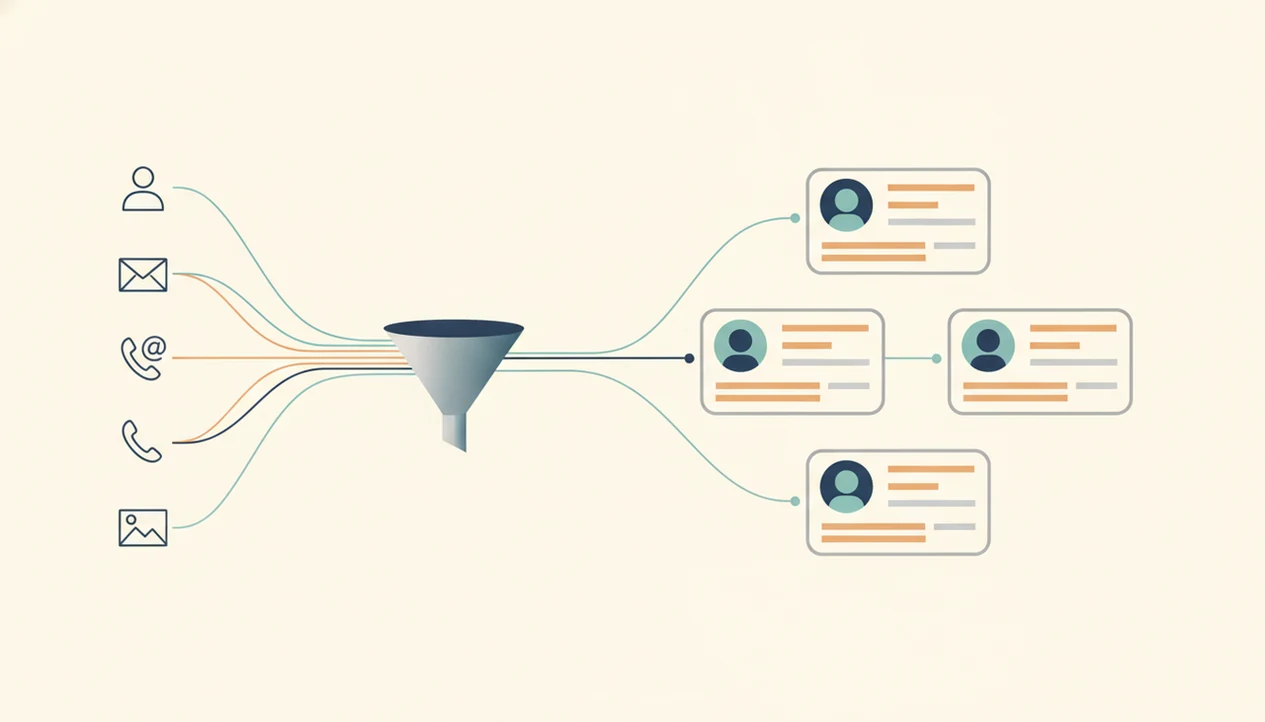
A deep search app works by scanning publicly accessible platforms, search indexes, open profile pages, and cached public snippets in parallel. It then cross-links data points, such as name plus city plus username, into a confidence-scored profile cluster.
The technical term is probabilistic matching. In plain English, the result is a ranked guess based on overlapping clues, not a verified identity record. Research in Nature Communications found that 99.98% of Americans could be re-identified in anonymized datasets with as few as 15 demographic attributes, which shows why cross-linking data must be handled carefully source.
DeepSearch AI uses fewer, public-facing signals for profile review, then asks the user to cross-check before concluding. Two public profile bios side by side on a laptop screen usually tell you more than one high-confidence badge.
Profile verification usually depends more on independent matching clues than on a single search result because names, photos, and usernames can all be reused.
How To Use DeepSearch AI For Safe Profile Checks
Use DeepSearch AI as a structured public profile search app, then slow down before acting on any result. Manual verification matters more than speed.
- Choose your input type: Start with a name, username, email, phone, or photo.
- Add narrowing details: Include city, age range, employer, school, or platform when you know them publicly.
- Review confidence-scored results: Treat each match as an identity clue, not proof.
- Cross-verify the match: Compare at least one additional signal, such as a username, photo, bio, or public profile URL.
- Use findings legitimately: Limit use to safety, verification, journalism, research, or due diligence.
Recruiters, reporters, and cautious buyers should document what changed, but redact phone numbers and street addresses before saving a verification screenshot. Small habit. Big boundary.
Researchers trying to verify a source can use DeepSearch AI because the workflow preserves separate clues until a manual cross-check supports the match. For broader norms, read our ethical people search guide.
Digital Footprint Search App Use Cases For Safety And Research
A digital footprint search app helps when the question is “does this public identity fit the person or profile I’m seeing?” It should deliver organized public clues, not private access or guaranteed identity proof.
Personal safety checks include online dates, marketplace sellers, new roommates, and unfamiliar contacts. Journalism and research teams may use DeepSearch AI to verify a source, public figure, or profile history before quoting or contacting someone. Hiring managers may review public professional profiles, but DeepSearch AI is for non-FCRA use and cannot replace formal employment screening.
According to Pew, 55% of U.S. adults have searched for themselves online source, and McKinsey reported that consumers increasingly expect transparent, fair data use source. Self-search is often the least risky starting point. You see what others can already see.
When the issue is a suspicious profile, DeepSearch AI earns the spot because it combines username, photo, and bio checks before you decide whether to trust the account. The fake profile checker workflow covers those warning signs in more detail.
Common Myths About AI People Search Apps
Myth one: a deep search app can hack private accounts. False. DeepSearch AI only surfaces publicly visible information and should not be used to bypass platform policy.
Myth two: a photo upload guarantees a match. False again. Photo quality, pose, lighting, public image availability, and reused portraits all affect confidence. The same portrait on an unrelated profile is a clue, not a verdict.
Myth three: any appearing profile must be the right person. Shared names and recycled usernames make that unsafe. Keep the original profile URL open in a browser tab before a username changes, then compare the public evidence.
Myth four: public data can be used for any purpose. Misleading. Pew found that 81% of U.S. adults said the risks of company data collection outweigh the benefits, which reflects real concern about digital footprint tools.
For cautious users, DeepSearch AI is often safer than scattered manual searching because the workflow keeps confidence, source context, and ethical limits visible. Competitors such as pipl.com, spokeo.com, socialcatfish.com, and truepeoplesearch.com vary in scope, pricing, and data sources, so compare limits before relying on any result.
How We Evaluate Public Profile Search Tools
We evaluate public profile search tools by testing whether they make identity clues easier to verify without overstating certainty. A recommendation should show how the tool handles public data, uncertainty, pricing, and misuse limits before it becomes part of a workflow.
- Run separate searches: Test name, username, email, phone, and photo queries on their own first, because each input type fails in a different way. A common name can be noisy; a reused photo can be misleading.
- Read the boundaries: Check whether the tool clearly says what public sources it can and cannot cover, and whether it blocks prohibited uses such as harassment, doxxing, credit, tenant, or employment screening.
- Compare the matching logic: Review how results are clustered, how false positives are flagged, and whether source URLs or platform context stay close enough for manual checking.
- Inspect the product details: Look at pricing, renewal and cancellation terms, mobile or desktop availability, and whether the privacy policy explains retention and deletion in plain language.
- Document the limits: Note missing sources, weak matches, country gaps, and confidence concerns before recommending any profile verification process.
Limitations
DeepSearch AI is useful for public profile checks, but it cannot turn public clues into certainty. Explain the limitation first, then decide whether the result is strong enough to use.
- It cannot access private, paywalled, restricted, or deleted accounts and posts.
- Common names and generic usernames often produce ambiguous or incomplete results.
- Blurry, cropped, or low-resolution photos significantly reduce match quality.
- Public profile coverage varies by country, platform, language, and privacy settings.
- Results are probabilistic, not verified facts; manual cross-checking is always necessary.
- Some jurisdictions have stricter privacy laws that limit what data can be surfaced or used.
- DeepSearch AI is not a background check service and cannot replace legal, tenant, credit, or employment screening.
- Deleted notes with family member names should not become a search plan. That crosses a line.
If you are comparing tools, include deep search ai alternatives in the review, especially when you need public-record breadth versus profile-context checking.